
1. Modular design and lower development costs

Modular design allows developers to reuse components and modules to create a web page rather than creating a web page using a restrictive template. Visually, modular design is a step up from templates. Developers can use it to create content blocks to display information is a powerful way.
2. The Arrival Of Progressive Web Apps (PWA)

When it comes to bringing the best of mobile sites and native apps by leveraging the technological advancements, Progressive Web Apps (PWA) appear like a great concept. It is based on the Internet evolution and adoption of HTML 5. You can provide the same functionality and flawless user experience to native apps with the help of PWAs.
3. Chatbots Rock

Chatbots can address customer support requirements quite effectively and you can count on bots for 24/7 assistance. There is no need to hire a full-time online customer service representative.
4. Push Notifications Prevail

Just like mobile apps, websites with push notifications can help you to reach a vast audience and leverage the benefits of online marketing. Push notifications are one of the most powerful solutions for engaging visitors and customers. However, you need to stay away from overusing them.
5. Static Websites Aren’t Going Anywhere

Yes, dynamic websites are quickly outpacing their static counterparts. But, it does not mean that static websites are dead. Actually, as we witness exponential growth in the number of websites in the web world, only simple and straightforward websites with a quick load time will succeed. Static websites can serve these objectives and provide a cost-effective option to business owners.
6. RAIL Concept On The Rise

Response Animation Idle Load (RAIL) designing concept is here since 2015. But, now we can expect that it will thrive in 2019 and beyond. The concept is associated with a faster load time (under 1 second) and the excellent performance of the website.
7. Motion UI Is Ready To Reign

Motion UI includes animated charts, hovers, background animations, and beautiful headers. You can stand your website out from the crowd with the help of motion UI.
8. Browser Extensions Will Be More Popular

Google Chrome extensions are much in demand these days and a massive article titled 20 Best Google Chrome Extensions To Make Your Life Easier proves it! But then, people have started considering browser extensions as a threat to their privacy. This is because such extensions can read a lot of online activities of the user with the help of various permissions. If you want to come up with the most useful extension, you need to take care of privacy protection.
9. VR And AR

VR and AR are futuristic technologies that are capable of changing the ways of interaction with websites. Companies like Google, Samsung, and Microsoft are investing a huge amount in these technologies. You can offer an immersive experience of the virtual world to the users with the help of VR.
10. Single Page Applications (SPAs) Will Thrive

Facebook, Gmail, and Github are highly popular examples of Single-Page Applications (SPAs). A SPA eliminates the requirement of reloading the web page when in use by loading all the content through JavaScript. SPAs work inside the browser and show natural behavior. Users like it because SPAs do not need additional waiting time, and directly render the web pages in the user’s browser.
11. Internet Of Things (IoT) Will Be In Focus

As per a Statista survey, there will be almost 31 billion connected devices in 2020. This enormous growth in the number of IoT devices will also impact the web development process as enterprises tend to control these devices through a desktop or laptop.
12. Blockchain Technology Will Find Its Place

Blockchain facilitates banks and financial organizations to keep the customer’s data safe with the help of algorithms. Therefore, the BFSI sector will integrate this technology into their system in the coming years.
13. AI And Machine Learning Will Gain Ground

Globally, big names including Facebook, Google, Microsoft, and Twitter are investing a large amount in both AI and machine learning. In the coming years, web developers may need to include features or functionality powered by AI. It brings radical changes in the web development domain.
14. JavaScript

JavaScript facilitates developers to build clean, robust, and more responsive websites. Closures, callbacks, are a few of the noteworthy features of this reliable framework. We can certainly expect that in the coming years, JavaScript-based frameworks or platforms will drive web development.
15. Static Website Generators

When there is a requirement of developing a static website with simple texts, web developers rely on static website generators. Such generators enable them to create static websites with user-friendly functionality. It includes faster loading, better security, and effective traffic management.
16. Illustration

When it comes to building a website, both web design and development go hand in hand. Illustrations, fonts, and forms are actually designed concepts. But they are useful for making websites more user-friendly and interactive. It is necessary for web development companies to stay updated with this design trend.
17. Typography

Though illustrations and animations can make the website more interactive and impressive, it is dangerous to neglect typography. Your website should be in line with your business model and typography assists it in meeting this requirement.
18. Voice Search Optimization

Siri, Alexa, and Google Assistant have started replacing text-based search functionality. Yes, it is expected that almost 50 percent of search queries will be done using voice instead of text by 2020. In other words, voice search has become a major trend and it influences major search engines worldwide.
19. Cybersecurity
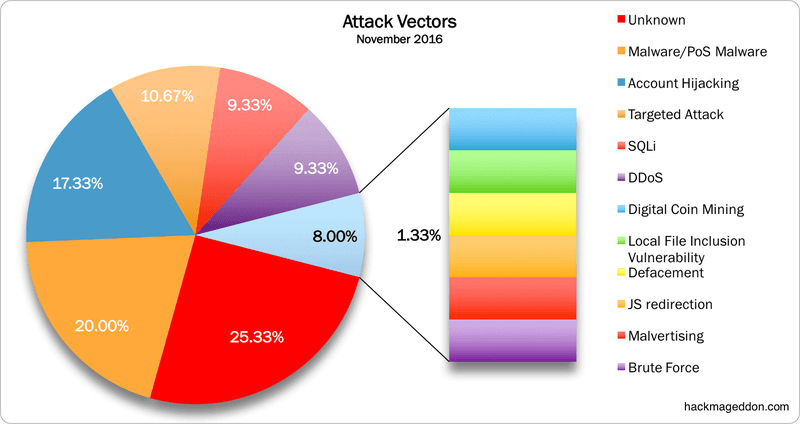
This is one of the most important web development trends as we witness the growing incidences of data breaches and other cybercrimes. Concerns related to data protection loom large for IT professionals and entrepreneurs alike.
20. User Behavior Tracking

In layman’s terms, this concept is related to the user’s online behavior. It involves the study of a number of clicks, user interaction, mouse movement, and various patterns of the user’s behavior. As the competition intensifies, companies strive for providing a pleasant user experience on their websites and apps.
Sources:
https://www.solwininfotech.com/blog/website-design/web-development-trends/
https://www.coredna.com/blogs/web-development-trends


 Brock Web Design